
For those playing along at home, I’ve been struggling with trying to find a reasonable way to protect my computer from random trojan / virus attacks as I wander bravely out onto the internet.
Initiaully I started to use Fedora Linux for “dangerous” stuff – but now that disk drive is running the web site. I still might go back to doing that.
In the interim, I downloaded a program called SandboxIE
http://www.sandboxie.com/
It’s apparently been around a while – it’s basically close to a rootkit, but that term carries a lot of baggage 🙂 What SandboxIE does is lets you start up any process inside the “Sandbox” – anything that process (or anything that process creates) stays stuck inside the sandbox. It is blissfully unaware it it lives inside a fake Windows. For you Linux fans, it’s roughly similar to a jailed chroot, but more thorough. It’s watching updates to the registry, use of named pipes, probably many things I haven’t found het. When a program attempts to open a file with write access, the existing file is copied into the sandbox, so it looks “real”, but the original file is left protected outside the sandbox.
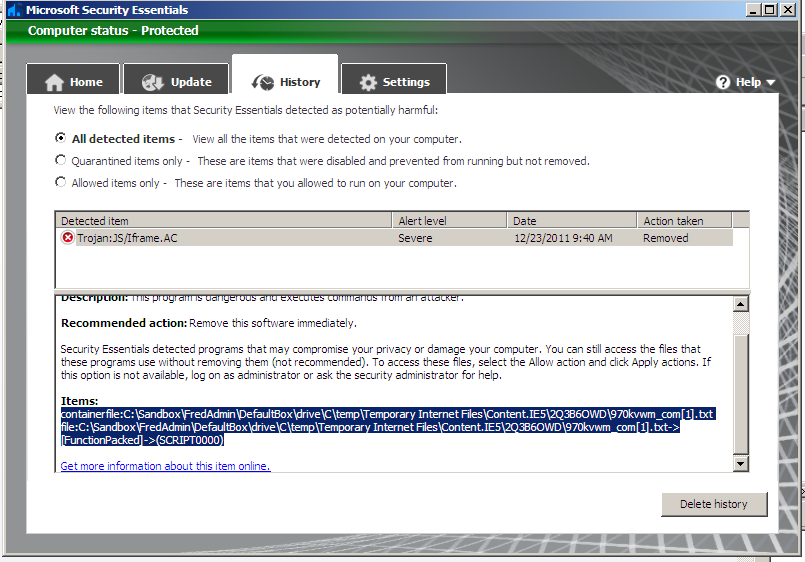
Today, it got its first real test. While looking at a radio station web site (not hijacked, just hacked), Microsoft Security Essentials alerted to the thing up above…. okay, here we go… I told MSE to “clean” the system, which it did, then looked at the history of the attack up above.
Look carefully at the filename of the location of the trojan and you’ll see the magic of sandboxie – MSE still alerts because it caught the trojan as it was being writtne to the sandbox – the fake C: drive within the C: drive
Anything that happened from that point on (had MSE not caught it) would still be operating under the control of Sandboxie. Any “damage” it did or attempts to modify the registry would still just be modifying the sandbox.
http://www.stopbadware.org/
reports this site was first reported to them by Google almost a month ago, and apparently is still not secured.
So, in conclusion it passed the first real test. It’s free, it’s pretty easy to use, and so far hasn’t broken anything. If you are running Windows, it’s worth giving a try.